A free Excel Gantt chart and construction program template for builders and trades. Pick a job template, set your start date and link each task to the one before. It works out every date in working days, skips weekends, public holidays and your Christmas shutdown, and shifts the lot when something runs over.
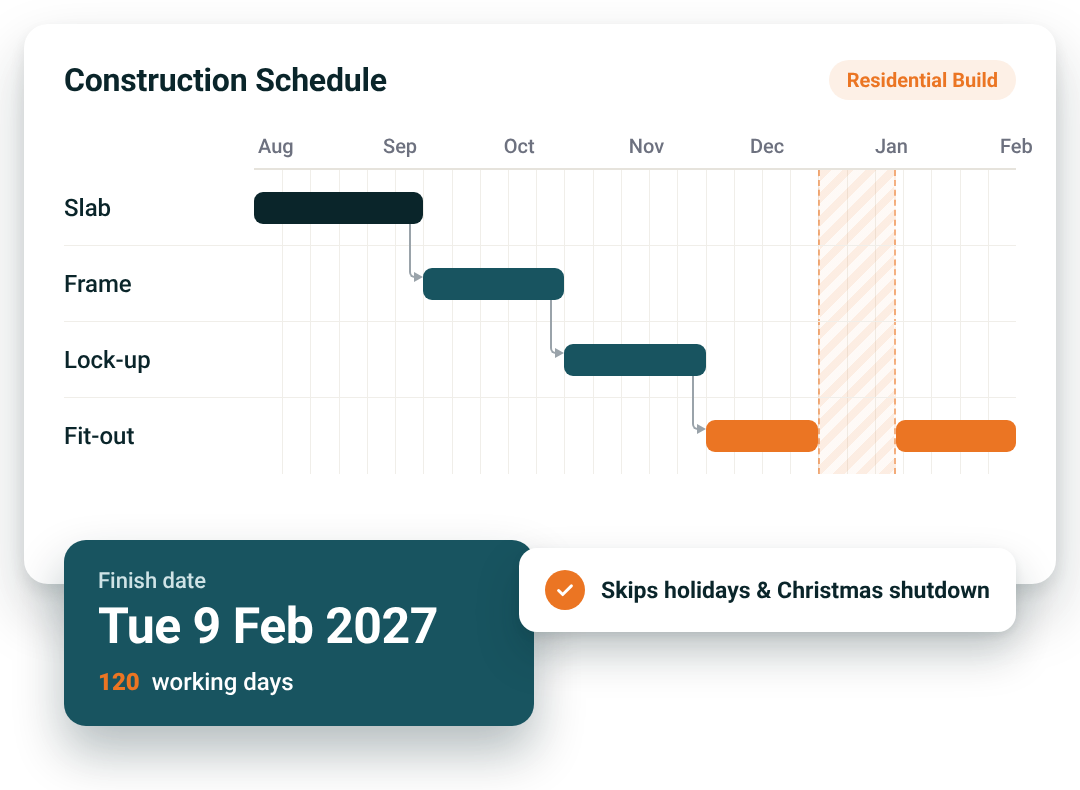
Pick a template, set a start date and the dates sort themselves out. No colouring in cells by hand.
Residential Build, Renovation, Landscaping, Roofing, Deck & Outdoor, or blank. Stages, tasks, durations and trades are already in.
Type in the day you start on site. Every task works out its own start and finish from there, in working days.
Mark tasks To Do, In Progress, Waiting on Others, Issue or Complete. Change a duration and everything linked to it moves.
A colour-coded Gantt chart with a job summary up top: finish date, working days, % complete, days to go and the next inspection. Late and upcoming tasks get flagged.
Pop your details in and we'll email the template straight to you.
Builders, renovators, landscapers, roofers and carpenters with a crew to keep on track. Juggling several jobs, waiting on inspections and booking trades around each other? This puts every job on one sheet. Works in Excel 2010 or later.

No more counting days on a calendar
Weekends, state public holidays (2026 to 2030) and your Christmas shutdown are built in. Work Saturdays? Flip one switch.
One change moves the whole job
Linked tasks follow each other, so three days of rain on the slab pushes frame, lock-up and fit-out without you touching them.
Something to hand the client
Prints on A3 landscape, ready for a client meeting or the site shed wall.
What's Inside
Most schedule templates are a coloured grid you fill in by hand. This one works the dates out for you. Set a start date and link each task to the one before. When rain pushes the slab back three days, change one number and everything after it moves.
Start = finish of the task it follows + 1 working day (or a fixed date you lock in). Finish = start + duration in working days, skipping weekends, public holidays and your shutdown.
Pick your job template and type in the day you start on site.
In the After # column, link each task to the one it follows. Inspections and milestones are already in place.
Lock in a fixed start date for anything already booked, like a crane, a pour or a delivery.
A new home in Kellyville NSW, eight stages from pre-construction to internal fit-out, using the Residential Build template. Includes NSW public holidays and a three-week Christmas shutdown (21 Dec to 8 Jan).
Schedules fall over in the same few places. The template catches each one.
Miss Easter or the King's Birthday and you're a week out before the slab's poured.
Leave a footings or frame inspection off and the next trade turns up to a job they can't start.
One task runs over, nothing else moves, and the client's finish date is already wrong.
A crane or pour booked for a set day gets pushed by the tasks around it. Fixed start dates stop that.
A spreadsheet's a good start, but it lives on one computer, the crew can't see it on site, and it can't tell you what each job's costing. NextMinute's drag-and-drop Gantt chart moves linked tasks when plans change, puts the schedule on your crew's phones, and keeps quotes, timesheets and invoices on the same job.

Reviews
Rated 4.9/5 with 100+ reviews on Google and Facebook, with local Aussie support that actually helps.


We’ve answered the ones we hear most from builders and tradies.

A construction schedule template is a ready-made plan that lists every stage and task of a job with its duration, trade and dates. NextMinute's free Excel version is a Gantt chart that works the dates out for you. Set a start date, link each task to the one before it, and it lays the job out in working days. It includes six job templates for builders, renovators, landscapers, roofers and deck builders.
Start from a template, not a blank sheet. Pick the job type closest to yours, type in your start date, then check each task's duration and who's doing it. Use the After # column to link tasks so they follow each other, and lock in fixed dates for anything already booked. The template skips weekends and public holidays, so the finish date it shows is one you can give the client. When the job outgrows a spreadsheet, look at NextMinute job planning.
Yes. Every date is worked out in working days. The template skips weekends, your state's public holidays from 2026 to 2030 and your Christmas shutdown. If your crew works Saturdays, flip one switch and Saturdays count as working days. A 120-working-day build shows its real finish date, not one that forgot Easter or the King's Birthday. For tracking the hours your crew actually works, see NextMinute timesheets.
There are six: Residential Build, Renovation, Landscaping, Roofing, Deck & Outdoor, and a blank template for anything else. Each comes with stages, tasks, typical durations and trades already filled in, so you're editing a schedule rather than building one from scratch. The Residential Build template runs from pre-construction through site prep, slab, frame, lock-up, services rough-in and fit-out. Landscapers can see how NextMinute handles bigger jobs on the landscaping software page.
Yes. Each task has an After # column where you enter the number of the task it follows. Once linked, it starts the working day after that task finishes. Stretch one task, like a three-day rain delay on the slab, and every linked task after it moves. For bookings that can't shift, such as a crane or a concrete pour, set a fixed start date instead. NextMinute's Gantt chart does the same with drag and drop.
The Residential Build template includes footings, slab pre-pour, frame, pre-line, waterproofing and the final inspection (for the occupation certificate, occupancy permit or Form 21, depending on your state). Milestones like approval issued, frame stage, lock-up and handover are in there too. The job summary at the top always shows the next inspection or milestone and its date, so you know what to book next. Builders running several jobs can see how NextMinute keeps them on track on the builders page.
An alert column flags tasks that are late, tasks that should have started but haven't, and anything starting in the next seven days. Each task also has a status (To Do, In Progress, Waiting on Others, Issue or Complete) that colours its bar on the chart. The job summary shows % complete, weighted by task length, and working days to go. To see costs against your estimate as well as dates, look at NextMinute job costing.
Yes. It's set up to print on A3 landscape, so the chart fits on one sheet you can hand to the client or pin up in the site shed. Switch the timeline view first: days for a close look at the next fortnight, weeks to show the whole build on one page. Change a date and reprint whenever the plan moves. If you'd rather the crew had it on their phones, see the NextMinute mobile app.
You need Microsoft Excel 2010 or later. The template is free. Fill in the form on this page and we'll email it straight to you. Once it's open, pick your job template, set your start date and check the durations against how your crew actually works. It's one of several free tools for trades, and you'll find the rest on the free resources page.
Once more than one person needs the schedule. A spreadsheet lives on one computer, your crew can't see it on site, and it can't tell you what each job is costing. NextMinute's drag-and-drop Gantt chart moves linked tasks when plans change, puts the schedule on every phone, and keeps quotes, timesheets and invoices on the same job. You can start a free trial and move a live job across.


Copyright © NextMinute Australia Pty Ltd. All Rights Reserved.