A free Excel sheet for Kiwi trade businesses comparing NextMinute with up to three other job management apps on the same 40 questions. Rate each one Yes, Partial or No, mark your must-haves, and the scorecard ranks them for you. Works in Google Sheets too.
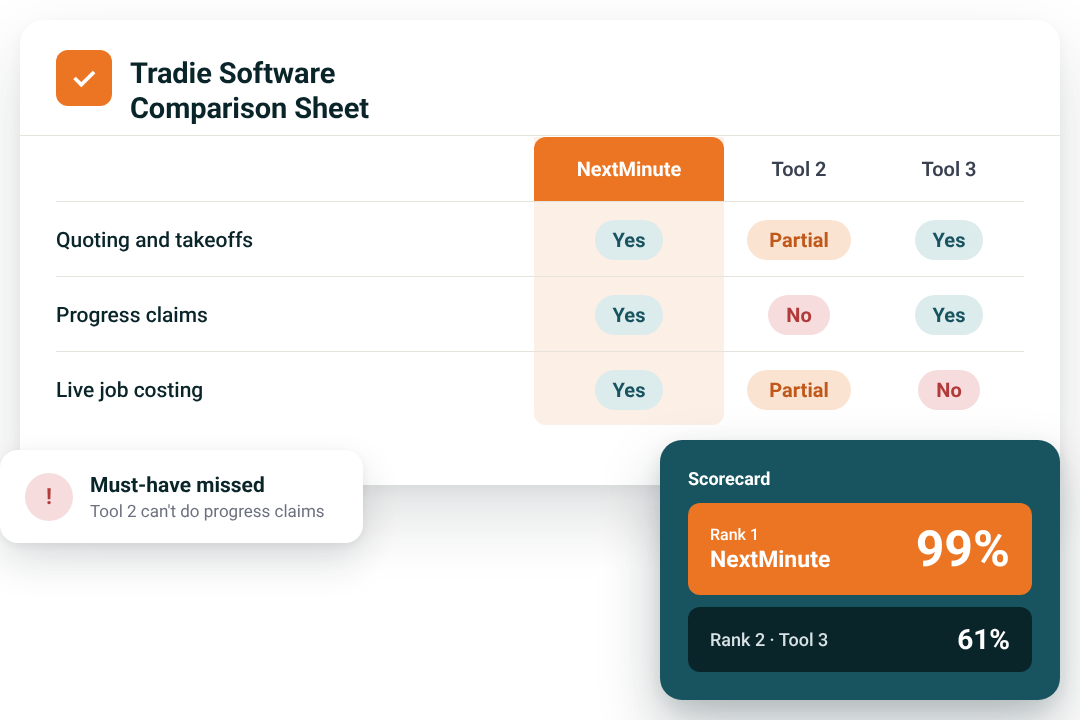
Fill it in as you sit through demos and trials. The sheet does the scoring, so you're comparing on the same questions, not gut feel.
Add up to three other apps you're looking at next to NextMinute in the header row.
Mark each question as a must-have, important or nice to have, so the score reflects how your business actually runs.
Work through the questions in a demo or trial and rate each one Yes, Partial or No, with room for notes.
An overall score for each app, a flag on any tool that misses a must-have, a rank from first to last, and what each one really costs in year one.
Pop your details in and we'll send the Excel file straight to your inbox. It also works in Google Sheets.
Running a Kiwi crew of three or more and moving off spreadsheets? Or outgrown the app you started with? This keeps the decision honest. Best for businesses running jobs that last weeks, not hours.

Every app gets the same 40 questions, so a slick demo can't dodge the hard ones.
The must-have check flags any app that misses one, so it can't hide behind a good overall score.
The true cost calculator adds per-user fees, add-ons, setup, training and contracts in NZD, not just the headline price.
The 40 questions are grouped into seven sections, each with a short note on what to look for. A separate tab covers what to ask on a demo, how to test a free trial properly and which hidden costs to watch for.
Shortlist your tools. Add up to three apps next to NextMinute in the header row.
Rate them on a real job. Book a demo or start a trial with each one and rate the questions as you go, with notes on anything Partial.
Check the true cost. Add per-user fees, add-ons, setup, training and contracts, then look at must-have flags before overall scores.
Updates automatically as you rate each tool.
Most bad software picks come down to the same few traps. The sheet's built to catch them.
Demos show the best bits. Rate each app on a real job in a trial.
The cheapest app costs more if the crew won't use it or it can't do payment claims.
If it doesn't work on a phone on site, the timesheets and photos won't happen.
Apps built for one-day call-outs struggle with staged scheduling, variations and job costing.
See how NextMinute stacks up on a real job. Quoting, scheduling, timesheets, payment claims and live job costing in one place, with your crew on the same system on site. Start a 10-day free trial, no credit card needed, or book a demo and bring the sheet.

Reviews
Rated 4.9/5 with 100+ reviews on Google and Facebook, with local NZ support that actually helps.


We’ve answered the ones we hear most from builders and tradies around New Zealand.

Put every tool through the same questions and rate them on a real Kiwi job. Our free comparison sheet has 40 questions on fit, core features, devices and integrations, support, pricing, reviews and growth. Set what matters to your business, rate each tool Yes, Partial or No, and the scorecard ranks them. Run each shortlisted app through a trial first. You can try NextMinute free alongside the others.
Yes. Rate it under the progress claims question in the Core Features section. For NZ construction work, check the software can produce payment claims that meet the Construction Contracts Act 2002, with the right details on each claim and GST handled correctly. If you invoice in stages, mark it as a must-have. Ask to see a sample claim in the demo rather than taking the website's word for it.
If you use Xero, yes. Most Kiwi trade businesses do their books in Xero, and job software that doesn't sync means typing invoices and bills in twice. In the comparison sheet, rate it under Devices and Integrations and check that invoices, supplier bills and payments all flow through, not just contacts. NextMinute has a two-way Xero integration built for trade businesses.
Yes, the comparison sheet is free for New Zealand businesses. Fill in the form on this page and we'll email you the Excel file. It also works in Google Sheets, so you can share it with your office and leading hand. You don't need a NextMinute account, and you can compare any tools you like. There are more free templates and calculators on our free resources page.
Compare in NZD and on what you'd pay in the first year, not the headline monthly price. Some tools quote in AUD or USD, so convert before you compare, and check whether prices include GST. Then add per-user fees, add-ons, setup, training and any contract. The comparison sheet's true cost calculator does the maths for each tool. See NextMinute's NZ pricing for a starting point.
Test the mobile app where your crew actually works, not just in the office. Plenty of NZ jobs are in rural areas or new subdivisions with patchy coverage. During the trial, have someone fill in a timesheet, add photos and check job notes from site. Add it as a must-have question in the sheet if your jobs are often out of town. See how the NextMinute mobile app works on site.
The best time to switch is a quieter patch, like the weeks around the Christmas shutdown or a wet stretch in winter. Start new jobs in the new system and finish jobs already underway the old way. Switching mid-season works too if you're losing money to admin now, but plan for a few slower weeks while the team learns it. Rate each tool's setup and training support in the sheet before you choose.
Get your crew involved before you choose, not after. Ask a leading hand to try each shortlisted app during the trial and add their notes to the comparison sheet. If the crew finds timesheets or photos fiddly on their phones, they won't use it, no matter how good the office side is. Keep the first rollout simple: timesheets and job notes first, then add more once it's a habit.
A must-have is something your business can't run without, like payment claims for a builder or timesheets from site for a crew. A nice-to-have makes life easier but won't stop you using the tool. Must-haves carry the most weight in the sheet's score, and any tool rated No on one is flagged. Keep the list short. If everything is a must-have, every tool will fail and the sheet won't help you decide.
Use the demo to learn the software and the trial to prove it works for your business. Run a real job through the trial, from quote to schedule, timesheets and invoice, and check it lands in your accounts properly. Rate the sheet as you go so you're not relying on memory. NextMinute's 10-day free trial needs no credit card, and our NZ team can walk you through it.


Copyright © NextMinute (New Zealand). All Rights Reserved.