Most Kiwi carpenters don't need more software. They need fewer loose ends.
A bit of Excel here, a notebook in the ute, WhatsApp threads with the crew, photos in someone's camera roll, supplier invoices on the kitchen bench, and accounting in Xero. It works for a while — and then a job gets messy and nobody can find what was agreed when.
This post is a practical look at the apps and tools that actually earn their spot in a New Zealand carpentry business in 2026, and the ones you can leave on the shelf.
What Kiwi carpenters actually need their tech to do
Before chasing the next shiny app, it's worth getting honest about the real day-to-day pressures for a small crew running 2 to 10 people in residential work:
- Quotes going out without all the detail nailed down
- Council inspections moving on you mid-week
- Variations agreed on-site and then forgotten by Friday
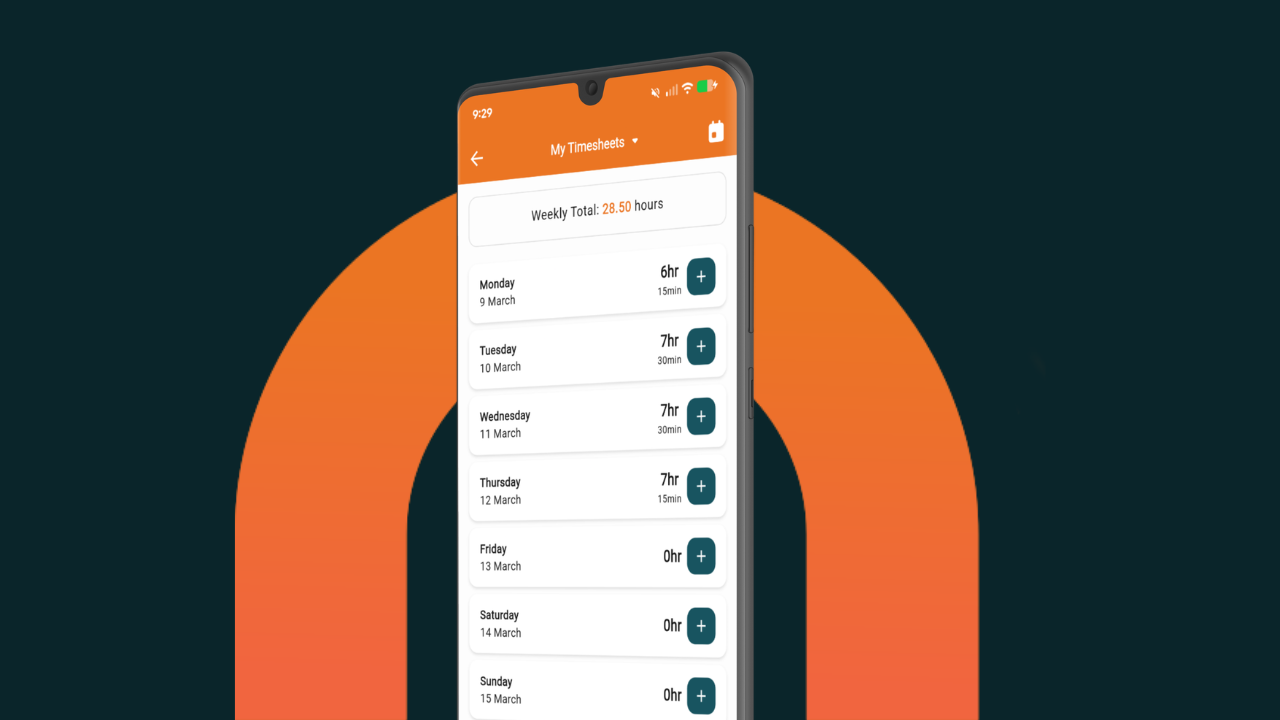
- Timesheets being a Sunday-night chore
- Material costs not landing back against the job they belong to
- Progress claims taking half a Saturday morning
- A vague feeling at the end of a build about whether the margin was actually there
You can paper over those with a stack of disconnected apps. Or you can have one core system in the middle, and a small handful of supporting tools that do the bits the core doesn't.
Start with the core: job management
The biggest difference for a Kiwi carpentry crew comes from having quoting, scheduling, the crew, time, costs, variations, and invoicing in one place — all tied to the same job. That's where NextMinute fits.
It gives you quoting, scheduling, timesheets, job costing and back costing, invoicing, client records, and a mobile app the crew actually opens on-site. It's been built in New Zealand for Kiwi crews, integrates two-way with Xero, MYOB, and QuickBooks, and is supported by an Auckland-based team that knows the trade.
Everything below is a supporting cast around that.
Accounting
Whatever your accountant or bookkeeper already uses — NextMinute syncs both ways with the big three.
- Xero (from ~NZ$45/month) — built in Wellington, the default for nearly every Kiwi tradie. Best bank feeds in the country, easy GST returns, and every bookkeeper knows it inside out.
- MYOB Business (from ~NZ$35/month) — perfectly fine if you're already there. Payroll handles New Zealand-specific PAYE, KiwiSaver, and leave calculations.
- QuickBooks Online (from ~NZ$30/month) — cheaper, with a tidy mobile app, but a smaller pool of NZ-based bookkeepers know it.
Material orders and trade accounts
Where Aussies have Bunnings PowerPass, New Zealand carpenters lean on a different set of trade accounts.
- PlaceMakers Trade (free with account) — the workhorse for most Kiwi residential carpenters. Account ordering, trade pricing, and exports that line up cleanly with Xero or MYOB.
- ITM Trade (free with account) — strong network through provincial New Zealand, often the better option outside the big cities, and decent timber and frame & truss capability.
- Carters Trade (free with account) — well-regarded for new build work, especially in Auckland and the upper North Island.
- Bunnings Trade (free) — fine for consumables and the in-between trips, but most carpenters run their main builds through one of the above.
- Mitre 10 Trade (free) — the second account most crews open when the local PlaceMakers is out of stock.
Plan markup on a tablet
If you work off architect drawings, marking them up on a tablet is a serious time-saver.
- Bluebeam Revu (~NZ$520/year Core) — the gold standard for measuring, marking up, and stamping revisions on PDFs. Pairs with NextMinute's takeoff imports.
- Morpholio Trace (from ~NZ$22/month, iPad only) — popular for fit-outs and renos where you want to sketch over a photo of the existing space.
If most of your work is architect-supplied PDFs, Bluebeam earns its money inside the first big job.
Tool tracking
Once the gear in the back of the ute is worth a decent four-figure number, tracking it starts to pay for itself.
- Milwaukee ONE-KEY (free with compatible tools) — inventory, lockout, and battery health. The default for crews running red gear.
- DeWalt Tool Connect (free app, tags ~NZ$45 each) — same idea for yellow crews, and tags work on tools that aren't already smart.
- Apple AirTags (~NZ$59 each) — the cheapest way to know where the trailer, generator, or van is sitting. Android crews use Samsung SmartTags.
Payments on the road
For collecting deposits or progress payments at handover without making the client mess about with bank transfers.
- Stripe Tap to Pay on iPhone (~1.9% + NZ$0.30) — no hardware needed, you tap the client's card straight to your phone.
- Square Reader (~2.2% tap) — cheap entry, reader is around NZ$95, deposits land next business day.
- Windcave EFTPOS Now (custom pricing) — Auckland-based, the choice if you want a proper EFTPOS terminal with local support.
Communications
Keep this simple. A small carpentry crew doesn't need enterprise comms.
- WhatsApp (free) — the default for crew chat, site photos, and quick client updates in NZ residential.
- Microsoft Teams or Google Chat — only worth it if you're already paying for the office suite.
Document storage and email
- Google Workspace Business Starter (~NZ$14/user/month) — business email on your own domain, Drive for shared folders, the basics. Most NextMinute crews end up here.
- Microsoft 365 Business Basic (~NZ$13/user/month) — pick this if your team is already living in Outlook and Excel.
AI tools for the admin side
Genuinely useful for the boring stuff, as long as you treat them as drafting assistants — not quote generators.
- ChatGPT Plus or Claude Pro (~NZ$32/month) — tidy client emails, draft scope-of-works descriptions, summarise long supplier quotes, or turn rough site notes into a proper variation write-up.
Health and safety
NZ residential work is increasingly inspected, and your obligations under the Health and Safety at Work Act 2015 don't disappear just because the crew is small.
- HazardCo — New Zealand-built, widely used across Kiwi residential carpentry for Site Specific Safety Plans (SSSPs), site sign-in, and hazard logging. Reasonable pricing for small crews.
- SiteApp Pro — Auckland-based, strong for site safety plans and inspections without commercial-grade pricing.
- MSite or HammerTech — only if you're working on Tier 1 or 2 commercial sites that mandate them. Don't buy these as primary tools.
Apprentice admin
Honest answer: you probably don't need a separate app for this. BCITO handles the formal training plan and assessor sign-offs through their own system. Track apprentice hours and site time in NextMinute timesheets and you've got the practical side covered.
Mapping
- Google Maps (free) — best live traffic in Auckland, Wellington, and Christchurch, with ETA sharing for the crew.
- Waze (free) — handy for dodging Auckland motorway pain.
A paid route planner is overkill at the kind of job volume most carpentry crews actually run.
What to ask before adding another app
Before you sign up for the next thing that looks good in a demo:
- Does it talk to your core system, or is it another silo?
- Will the crew actually use it on-site, or will it sit on the office laptop?
- Does it replace something you already pay for, or just add to the stack?
- Does it solve a real pain point, or is it just a nice-to-have?
If the honest answer is “no” to most of those, it isn't the right fit — no matter how slick the marketing.
So what's the best app stack for a Kiwi carpentry business?
For most NZ carpentry crews of three or more people, the setup that actually works looks like this:
- NextMinute as the operational core — quoting, scheduling, timesheets, costs, variations, invoicing.
- Xero or MYOB for the books, synced two-way via NextMinute's integrations.
- PlaceMakers, ITM, or Carters Trade as your main trade account.
- Bluebeam if you mark up drawings often.
- A tracking app for the gear.
- WhatsApp for crew chat.
- Google Workspace or Microsoft 365 for email and admin.
- HazardCo or similar for site safety if your work needs it.
That's it. Anything beyond that is usually noise.
If you want to see how the operational core works for a Kiwi carpentry crew specifically, the carpenter software page walks through it, or you can book a 15-minute intro with the Auckland team. No pressure pitch — just a quick look at whether it fits how you actually run jobs.